There comes a point when external hard drives, scattered cloud subscriptions and multiple backup destinations become more of a headache than a solution. Files are spread across devices, storage keeps filling up, and finding the right version of a document can become an exercise in patience. For businesses and professionals dealing with increasingly large volumes of data, a Network Attached Storage (NAS) system offers a more organised approach.
Synology has built a considerable reputation in this space, largely because it understands that a NAS needs to do more than simply provide somewhere to store files. It should also make managing, accessing, protecting and sharing that data relatively straightforward.
The DiskStation DS1525neo+ follows that philosophy. This five-bay NAS combines a familiar Synology hardware platform with the company’s DiskStation Manager (DSM) operating system and a useful selection of connectivity and expansion options. Its most interesting feature, however, is arguably not its processing power or storage capacity. It is the decision to offer a more accessible memory configuration while retaining support for both ECC and non-ECC memory.
For our evaluation, we paired the DS1525neo+ with two Synology HAT3310-12T 12TB SATA Plus Series hard drives, giving us 24TB of combined raw storage capacity. This provided a practical configuration for exploring its storage capabilities and considering how well the system fits into a small business or professional environment.

Familiar design, practical functionality
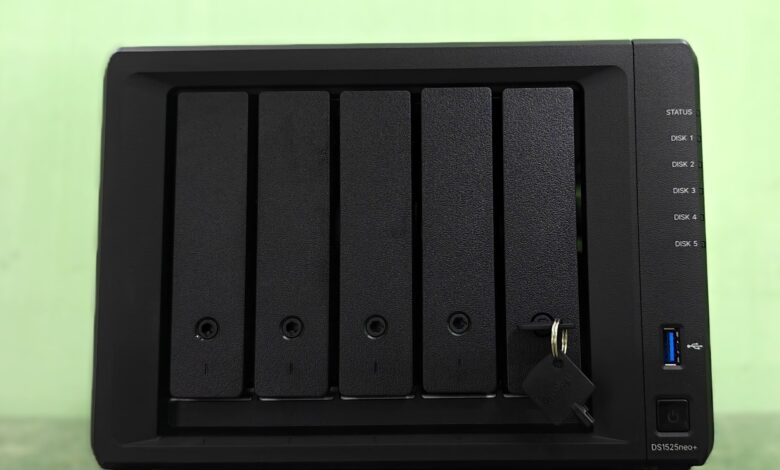
The DS1525neo+ does not attempt to reinvent NAS hardware design, and that is probably a sensible decision. Its desktop enclosure measures 166 x 230 x 223mm and weighs approximately 2.67kg without drives. It is compact enough to sit on a desk, shelf or in a small office environment without demanding dedicated rack space.
The front panel houses five vertically arranged, hot-swappable drive bays, each with individual status indicators. The drive trays accommodate standard 3.5-inch SATA hard drives and 2.5-inch SATA drives, including SSDs. This provides flexibility when deciding how to configure storage, whether the priority is maximum capacity, faster access or a combination of both.
The front also features a USB 3.2 Gen 1 port, alongside the power button and system indicators. Around the back are the networking connections, an additional USB port and two USB-C expansion interfaces.
Cooling is handled by two 92mm fans, with Full-Speed, Cool and Quiet operating modes. Synology quotes an idle noise level of 22.6dB(A) under its specified test conditions. This makes the unit suitable for office environments where a constantly audible storage server would quickly become irritating.

The design is functional rather than particularly exciting. However, a NAS is not something most people buy for its appearance. What matters is that drives can be installed or replaced without unnecessary complications and that the system can operate reliably in the background.
Five drive bays offer room to grow
The five-bay configuration is arguably one of the DS1525neo+’s strongest selling points.
A two-bay NAS is sufficient for basic file storage and backup, but capacity and RAID flexibility become limiting factors relatively quickly. Four bays provide considerably more room, while five bays offer an additional degree of flexibility when balancing capacity, redundancy and future expansion.
For our review, we installed two Synology HAT3310-12T 12TB SATA Plus Series hard drives, providing 24TB of combined raw capacity. These are 3.5-inch, 7,200rpm helium-sealed drives with a 512MB cache and a rated maximum sustained transfer speed of 281MB/s per drive.
The HAT3310-12T is designed for NAS environments and offers a suitable combination of capacity, rotational speed and sustained performance for centralised storage workloads.
With two drives installed, you can configure the system using RAID 1 or Synology Hybrid RAID (SHR), among other options. Both RAID 1 and a two-drive SHR configuration provide redundancy against a single drive failure. In this configuration, approximately 12TB of usable capacity is available before filesystem overhead.

The advantage of having five bays is that you have three additional slots available for future expansion. Rather than replacing the NAS when storage requirements increase, additional drives can be installed and the storage pool expanded, subject to the selected RAID configuration and Synology’s expansion requirements.
The DS1525neo+ supports Synology Hybrid RAID, Basic, JBOD, RAID 0, RAID 1, RAID 5, RAID 6 and RAID 10. For most small businesses, SHR or RAID 5 would be sensible starting points, depending on capacity and redundancy requirements. Those handling particularly important business data may prefer SHR-2 or RAID 6, which can tolerate two drive failures.
The system also supports two DX525 expansion units, potentially increasing the total number of drives to 15. With compatible high-capacity drives, this provides up to 360TB of raw storage capacity. Of course, raw capacity and usable storage are two different things. RAID configurations, redundancy and filesystem overhead reduce the actual space available for storing files.
Processing power: Built for storage-intensive workloads
At the heart of the DS1525neo+ is AMD’s Ryzen V1500B processor, a 64-bit quad-core chip running at 2.2GHz, with eight threads.
It is not a particularly new processor, nor is it designed to compete with the latest desktop CPUs. However, the distinction is important. A NAS is primarily a storage and network management device, and its processor needs to handle file transfers, indexing, backups, synchronisation, encryption-related software operations and multiple concurrent connections.
For these workloads, the Ryzen V1500B provides a capable foundation. The DS1525neo+ is designed to handle more than simple file sharing. It can support multiple users accessing shared folders, automated backup operations, photo management, surveillance workloads and synchronisation between different locations.

It also supports Docker containers and virtual machine-related workloads through Synology’s software ecosystem. This gives IT administrators additional flexibility to run selected applications and test environments directly on the NAS. However, there is a distinction between supporting virtualisation and being a dedicated virtualisation server. The processor and memory configuration are better suited to moderate workloads than running numerous demanding virtual machines simultaneously.
For a small business looking to consolidate file storage, backup and selected network services, the hardware makes sense. Those planning to run extensive virtualisation environments or processor-intensive applications should consider a more powerful platform.
The neo+ difference: Memory flexibility
The most significant distinction between the DS1525neo+ and the standard DS1525+ is memory. The DS1525neo+ ships with 4GB of DDR4 non-ECC SODIMM memory, compared with the 8GB of ECC DDR4 memory supplied with the standard DS1525+. Both models have two memory slots and support a maximum of 32GB using two 16GB modules.
At first glance, shipping a five-bay NAS with only 4GB of RAM might seem like an unnecessary compromise, particularly when the system is intended for multiple users and applications. However, the neo+ series is positioned as a more affordable alternative, and the reduced initial memory configuration is part of that strategy.

More importantly, users are not restricted to non-ECC memory. The DS1525neo+ supports both ECC and non-ECC DDR4 memory, providing greater flexibility when upgrading. This is particularly useful for businesses that want to start with the standard configuration and increase memory as their requirements grow. It also gives technically experienced users more freedom when sourcing compatible memory.
There is, however, an important qualification. Synology states that it may not provide complete product warranty or technical support when non-Synology memory modules are used for expansion. Buyers should consider this before opting for third-party upgrades.
For everyday NAS workloads, 4GB is a reasonable starting point, but I would recommend considering an upgrade if the intention is to run several applications, manage extensive photo libraries, host containers or support a growing number of users. The memory configuration is ultimately one of the reasons the neo+ makes sense. It allows buyers to decide how much they want to invest in the hardware upfront rather than paying for a higher specification that they may not immediately need.
Networking: 2.5GbE is a welcome starting point
Connectivity is another area where the DS1525neo+ gets the fundamentals right. The system comes with two 2.5GbE Ethernet ports, offering considerably more bandwidth than the traditional Gigabit Ethernet connections found on older and entry-level NAS devices.

The two ports support link aggregation, allowing them to be combined for increased aggregate bandwidth across multiple connections. However, this does not mean that a single client will automatically receive a 5Gbps connection. Individual connection speeds depend on the network configuration and supported protocols.
For a small office with a compatible multi-gigabit switch, the dual 2.5GbE ports provide a useful foundation for faster file transfers and multiple simultaneous users. There is also an option to add 10GbE networking using Synology’s E10G22-T1-Mini network upgrade module. This is particularly relevant for creative studios, production environments and businesses regularly transferring large files across their networks.
For example, teams working with high-resolution photographs, video footage and large design projects can benefit considerably from faster network connectivity. The upgrade also gives the NAS additional headroom as the rest of the network infrastructure evolves. However, the 10GbE module is an additional purchase, and buyers will need compatible switches, network adapters and cabling to benefit from it.
The inclusion of two 2.5GbE ports as standard is a sensible decision, even if I would have liked to see 10GbE connectivity integrated directly into the hardware.
Performance: The drives and network make a difference
A NAS’s performance cannot be judged by its processor alone. The drives, RAID configuration, network interface, client hardware and type of files being transferred all influence the experience.

Our DS1525neo+ configuration uses two HAT3310-12T drives. Each drive has a manufacturer-rated maximum sustained transfer speed of 281MB/s. This is a drive-level specification rather than a guaranteed NAS transfer speed, but it provides a useful indication of the storage hardware’s capabilities.
The two onboard 2.5GbE ports are equally important. A single 2.5GbE connection offers a theoretical maximum bandwidth of 312.5MB/s, before network and file-sharing overhead. This means that a single connection can already accommodate much of the sequential throughput available from one of these hard drives.
With two network connections operating through link aggregation, the NAS can provide greater aggregate bandwidth for multiple clients. However, it is important to distinguish aggregate throughput from the speed available to an individual workstation.
Synology’s own performance figures for the DS1525neo+ and DS1525+ platform indicate sequential throughput of up to 696MB/s read and 862MB/s write with HDD configurations under its laboratory testing conditions. With supported SSD configurations and 10GbE connectivity, the manufacturer quotes up to 1,181MB/s read and 1,180MB/s write. These are controlled laboratory results, not expected speeds from our two-drive configuration.
In our independent testing in RAID 1, we recorded sequential read speeds of approximately 297MB/s and write speeds of 235MB/s. For our two-drive configuration, the practical advantage is the combination of 7,200rpm drives and 2.5GbE networking. It provides sufficient bandwidth for everyday file sharing, centralised storage and backup workloads without immediately requiring a 10GbE infrastructure investment.

The optional 10GbE module becomes more relevant when the NAS is populated with additional drives, configured for higher-performance storage pools or accessed simultaneously by several workstations. Ultimately, the DS1525neo+ offers considerable performance headroom, but the actual benefit depends on how the system is configured. It is worth remembering that a NAS is only as fast as its slowest component.
NVMe storage and SSD caching
The DS1525neo+ includes two M.2 2280 NVMe SSD slots, providing additional options for improving storage performance. These drives can be configured for SSD caching, which can help improve responsiveness when frequently accessed data is requested repeatedly. This is particularly useful in environments with multiple users accessing the same files or applications.
There is also support for using compatible Synology Enterprise Series NVMe drives to create SSD storage pools. This allows users to build a faster storage volume for applications and workloads that benefit from lower latency. The limitation is that third-party NVMe SSDs are restricted to caching rather than being supported as storage volumes under Synology’s compatibility requirements.
This is worth considering because NVMe drives have become considerably more accessible, and many users already have spare SSDs available. Being unable to use any third-party NVMe drive as a regular storage volume takes away some of that flexibility. Nevertheless, the combination of five conventional drive bays and two NVMe slots provides a useful balance between high-capacity storage and faster access to selected workloads.

DiskStation Manager remains the biggest advantage
Hardware specifications only tell part of the story with Synology. Its DiskStation Manager operating system is arguably one of the biggest reasons the company’s NAS products remain relevant across different user segments. DSM provides a browser-based interface for managing storage, users, applications, network settings and security. The desktop-like interface makes navigating the system relatively straightforward, even for people who are not particularly familiar with network storage.
More importantly, the software ecosystem turns the DS1525neo+ into something considerably more useful than a centralised file server. Synology Drive provides private cloud functionality, allowing users to synchronise files across computers and mobile devices, access documents remotely and share content with colleagues. Versioning also helps recover earlier file versions following accidental changes or deletions.
Synology Photos provides tools for organising and managing personal and business image libraries. For photographers and creative professionals, having a central location for storing and organising large collections of photographs can be particularly useful. Active Backup for Business brings together backup capabilities for supported computers, servers and virtual environments. Businesses can centralise backup operations rather than depending on individual employees to remember to copy important files.
Hyper Backup provides additional options for backing up NAS data to external destinations, remote servers and supported cloud storage services. Surveillance Station is another important component of the ecosystem. It allows the NAS to function as a network video recorder, supporting a broad range of compatible IP cameras. Two camera licences are included, with additional licences available separately.
There are also collaboration and productivity applications, including Synology Office and Chat, alongside tools for synchronisation, monitoring and system administration. This breadth of software is important because it reduces the need to purchase separate solutions for every storage-related requirement.

For a small business, the DS1525neo+ could serve as a central file server, backup destination, private cloud and surveillance storage platform. That versatility is what gives Synology’s NAS ecosystem much of its appeal.
Data protection is more than RAID
One of the biggest misconceptions surrounding NAS devices is that RAID automatically means data is safe. It does not. RAID protects against certain drive failures, but it does not protect against accidental deletion, ransomware, hardware damage, theft or other events that could compromise the entire NAS.
This is where DSM’s backup and data protection features become important. The DS1525neo+ supports Btrfs and EXT4 filesystems. Btrfs is particularly useful for businesses because it supports features such as snapshots and data protection mechanisms that help manage file changes and recover from certain types of data loss.
The system’s snapshot capabilities allow administrators to retain earlier versions of shared folders and restore data when necessary. Combined with appropriate backup policies, this provides an additional layer of protection. The system also supports immutable snapshots for supported workloads, helping protect critical data against unauthorised changes and certain ransomware scenarios.
However, businesses should still follow the 3-2-1 backup principle: maintain three copies of important data, on two different types of storage, with at least one copy stored off-site. A NAS is an excellent part of that strategy, but it should not be the only component.

Power consumption and everyday operation
A NAS is generally expected to remain switched on around the clock, so power consumption and operating noise deserve attention. Synology quotes power consumption of approximately 44.56W during access and 13.63W when the hard drives are in hibernation. Actual consumption will depend on the number and type of installed drives, workload and operating conditions.
The two 92mm fans have different operating modes, allowing users to prioritise cooling performance or quieter operation. The quoted noise level of 22.6dB(A) suggests that the DS1525neo+ should be reasonably unobtrusive in a suitable office environment. However, the mechanical noise produced by conventional hard drives can be more noticeable than the fans themselves.
This is particularly relevant when installing the NAS in a home office or a workspace where people spend considerable time. A dedicated storage cupboard or ventilated equipment area would be preferable for businesses running several NAS devices or other network equipment.
Verdict: A sensible NAS for growing storage requirements
The Synology DiskStation DS1525neo+ is not a radical departure from what Synology has already established with its Plus series. Instead, it takes a proven five-bay platform and makes it more accessible through a different memory configuration and broader memory compatibility. That is not necessarily a bad thing.
For small and medium-sized businesses, the ability to centralise files, automate backups, manage user access and provide secure remote access through a single device is genuinely useful. Creative professionals also have a good reason to consider it, particularly when working with large collections of photographs, video footage and other media files.
Our configuration, featuring two Synology HAT3310-12T 12TB SATA Plus Series drives, provides 24TB of raw storage capacity and a useful starting point for a growing storage environment. The five drive bays provide room for expansion, dual 2.5GbE connectivity offers a capable networking foundation, and the optional 10GbE upgrade provides an upgrade path for more demanding environments.
Add the two NVMe slots and Synology’s extensive DSM ecosystem, and there is plenty of functionality to work with. The biggest consideration is the overall investment. The NAS enclosure is only the beginning. Hard drives, additional memory, NVMe storage and potentially a 10GbE upgrade can increase the total cost considerably. Buyers should calculate the complete configuration rather than judging the product by its diskless price.
The DS1525neo+ is best suited to businesses and professionals who need an expandable storage platform without moving into more expensive enterprise infrastructure. It is also a good option for advanced home users who want more control over their digital files and backups.
It is not the most powerful NAS in its category, nor does it introduce particularly groundbreaking hardware. But it understands what many people actually need from a NAS: sufficient capacity, reliable data management, useful networking and software that makes the entire experience manageable.
And sometimes, getting those fundamentals right matters considerably more than having the latest processor on the specification sheet.
Price: AED 3850 (Diskless NAS), AED 2450 (Synology HAT3310-12T 12TB SATA Plus Series)
Product photography by Ryan Chris
Synology DiskStation DS1525neo+ AED 3850 (Diskless NAS), AED 2450 (Synology HAT3310-12T 12TB SATA Plus Series)
-
Final Rating
Summary
The DS1525neo+ is best suited to businesses and professionals who need an expandable storage platform without moving into more expensive enterprise infrastructure. It is also a good option for advanced home users who want more control over their digital files and backups.