There is a difference between a laptop that is easy to carry and one that is genuinely convenient to work on. The former needs to be lightweight. The latter needs to get several things right simultaneously: a comfortable keyboard, a usable display, dependable connectivity, sufficient processing power and, preferably, enough battery capacity to get through a working day.
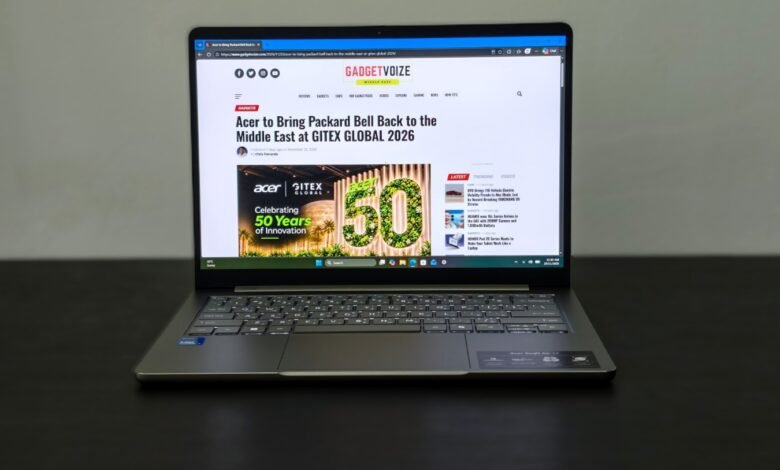
The Acer Swift Air 14 (SFA14-I31) attempts to bring these requirements together in a relatively affordable package. It is a 14-inch Windows notebook built around Intel’s Core Series 3 processors, with an emphasis on mobility rather than raw computing power. Acer has also included a few features that make it more interesting than a conventional entry-level office laptop, including a 120Hz display, a 70Wh battery, an infrared webcam and two USB4 ports.
The particular Middle East configuration, SFA14-I31-58ZG, comes with an Intel Core 5 320 processor, 12GB of LPDDR5X memory and a 512GB PCIe Gen 4 SSD. That combination should be sufficient for a considerable portion of everyday computing. However, the more interesting question is whether Acer has made the right compromises to produce a laptop that remains useful beyond basic office applications.

A design that prioritises mobility
The Swift Air 14 is built around a simple idea: make a reasonably capable Windows laptop that people won’t think twice about carrying around. At approximately 1.19kg, it achieves that objective rather well. Its 14-inch footprint and slim profile make it convenient to slip into a backpack or laptop bag, while the aluminium chassis gives it a more sophisticated appearance than the weight and positioning might suggest.
The design is understated, which I consider appropriate for a productivity notebook. Acer hasn’t attempted to make the Swift Air 14 look like a gaming machine or a futuristic concept device. Instead, the emphasis is on clean surfaces, restrained branding and a relatively uncomplicated exterior.
The CNC-finished aluminium lid adds some visual character. Colour options such as Sage Green, Frost Blue, Blossom Pink and Lilac Purple also provide alternatives to the usual silver and grey laptop finishes. The Sage Green version is particularly distinctive without being distracting in a professional environment.
One feature worth mentioning is the 180-degree hinge. It allows the display to open completely flat, which can be useful when sharing information across a desk or collaborating with colleagues. It doesn’t transform the laptop into a convertible, but it does provide some additional flexibility.
There is, naturally, a trade-off associated with making a laptop this thin. The chassis doesn’t have the substantial feel of a heavier business notebook, and buyers should not mistake its aluminium construction for the sort of reinforced build found on more expensive professional machines. Nevertheless, the Swift Air 14 makes a good first impression. It looks appropriate in an office, a university classroom or a coffee shop, and its weight is arguably one of its most important selling points.

Display: More room for work, less unnecessary scrolling
Acer has equipped the Swift Air 14 with a 14-inch IPS display offering a resolution of 1920 x 1200 pixels. The 16:10 aspect ratio is an important part of the experience. Compared with a conventional 16:9 panel, it provides additional vertical space, which is useful when working with long documents, spreadsheets, web pages and applications with extensive toolbars.
For someone who spends several hours a day writing, researching or managing multiple browser windows, this is a practical improvement rather than a specification that simply looks good on a product sheet. The 100% sRGB colour gamut is another positive. It provides a reasonably broad colour range for everyday image work, presentations and multimedia. While this isn’t a professional-grade creator display, it should be adequate for occasional photo adjustments and other light visual tasks.
The 120Hz refresh rate is perhaps the most noticeable specification upgrade compared with conventional office laptops. Scrolling through lengthy documents, moving between applications and navigating the Windows interface should feel smoother. It also makes general use more pleasant, although it doesn’t automatically make the laptop suitable for gaming.
The matte ComfyView finish is particularly appropriate for a machine intended to travel. It reduces distracting reflections and is useful when working under office lights or near windows. The panel is rated at approximately 350 nits, which should be sufficient for most indoor environments. It isn’t intended for sustained outdoor work in direct sunlight.
There are two omissions worth considering. The screen isn’t touch-enabled, and its WUXGA resolution doesn’t offer the pixel density of more expensive high-resolution notebooks. Neither is necessarily a problem for the target audience, but people accustomed to sharper premium displays may notice the difference.
Overall, Acer has made a sensible choice here. The display prioritises workspace, readability and smooth operation rather than chasing an unnecessarily high resolution.

Keyboard and touchpad: The everyday essentials
A laptop can have the latest processor and an impressive specification sheet, but if typing on it becomes uncomfortable after an hour, those advantages quickly lose their appeal. The Swift Air 14 uses a conventional chiclet keyboard with white backlighting. The layout is familiar, and the keys are sufficiently spaced for everyday typing. It should be comfortable for writing reports, preparing presentations, responding to emails and working on lengthy documents.
The backlit keyboard makes typing comfortable in different lighting conditions, while the dedicated controls for system functions, including microphone muting and AcerSense, add to the overall convenience. These thoughtful touches make everyday interactions simpler, particularly for people who regularly switch between writing, meetings and other productivity tasks.
The Microsoft Precision-certified touchpad is equally practical. It supports Windows gestures, multi-finger navigation and responsive pointer controls, providing a smooth and familiar experience. Its generous surface area offers sufficient room for comfortable navigation, making it easy to work on the move without having to rely on an external mouse. Together, the keyboard and touchpad provide a comfortable and dependable input experience for everyday productivity.

Connectivity: A surprisingly useful selection
Connectivity is an area where the Swift Air 14 deserves some credit. Acer has included two USB4 Type-C ports, one USB-A port and a 3.5mm audio combination jack. The USB4 connections provide high-speed data transfer and support compatible display and docking solutions.
For a mobile professional, this is particularly useful. A single compatible USB-C connection can provide access to external displays, storage and other desk accessories through a docking station. The two USB4 ports also provide flexibility when charging and connecting peripherals. However, buyers should check the specifications of their intended docking station and accessories rather than assuming every Thunderbolt 4 feature is supported simply because the laptop has USB4.
The single USB-A port is sufficient for a mouse, flash drive or other conventional accessory, but it can become restrictive if several older peripherals need to be connected simultaneously. There is no built-in HDMI connector, Ethernet port or SD card reader. This is an understandable consequence of the slim design, but it means that certain users will need to invest in a USB-C hub.
Wireless connectivity includes Intel Wi-Fi 6E and Bluetooth 5.3 or later, depending on the configuration. Wi-Fi 6E provides access to the 6GHz wireless band when used with a compatible router. It isn’t the latest Wi-Fi 7 standard, but it should be perfectly adequate for video conferencing, cloud applications, online collaboration and streaming.
For a laptop in this category, the presence of two USB4 ports is more valuable than adding several slower connections simply to increase the port count.

Processing power: Designed for efficiency, not heavy lifting
The Swift Air 14 uses Intel’s Core Series 3 platform, with the Core 5 320 powering the Middle East configuration. This is a six-core, six-thread processor based on Intel’s Wildcat Lake architecture. It combines two performance cores with four efficiency cores, allowing the system to distribute workloads according to their requirements.
The idea is straightforward: deliver enough processing capacity for everyday applications without consuming the power associated with more demanding processors. The Core 5 320 operates at a base frequency of 1.5GHz, with its performance cores capable of reaching higher boost frequencies. It is paired with integrated Intel Graphics rather than a discrete GPU.
For everyday computing, the processor should be comfortable handling Microsoft Office applications, web browsing, email, video conferencing and general multitasking. However, there is a distinction between running several ordinary applications and handling demanding professional workloads. Complex video editing, substantial software development projects, extensive data processing and graphics-intensive applications require more computing resources than this machine is designed to provide.
The integrated graphics are similarly positioned. They are suitable for desktop rendering, video playback and light graphics work, but this isn’t a laptop I would recommend for someone whose regular work involves 3D rendering or GPU-intensive creative applications. The 12GB LPDDR5X memory in the UAE configuration is adequate for ordinary productivity. The problem is that it is soldered onto the motherboard, with no conventional memory upgrade option. Acer lists 16GB as the maximum supported capacity for the product family.

This makes configuration selection important. Anyone planning to keep the laptop for several years should consider the 16GB version if it is available at a reasonable price. Storage is handled by a 512GB PCIe Gen 4 NVMe SSD. It provides a reasonable starting capacity for applications, documents and everyday files. The M.2 storage can be replaced, although buyers should not expect the flexibility of multiple internal storage slots.
The Swift Air 14 is therefore best suited to workloads that benefit more from a responsive everyday computing experience than from sustained processing power.
AI features: Useful additions, with a few limitations
The presence of an NPU is becoming increasingly common in modern laptops, and Acer has included one in the Swift Air 14. The Intel NPU in the Core 5 320 configuration is rated at 16 TOPS. It is designed to accelerate compatible AI workloads locally, helping certain applications perform tasks without relying entirely on the CPU or graphics processor.
However, there is an important distinction between an AI-capable laptop and a Microsoft Copilot+ PC. Microsoft’s Copilot+ category requires at least 40 TOPS of NPU performance. The Swift Air 14 does not meet that threshold. This doesn’t mean its AI functionality is irrelevant. It simply means buyers should have realistic expectations.

The laptop supports Microsoft’s Copilot experience through Windows, providing access to AI-assisted research, writing, summarisation and general assistance, subject to Microsoft’s software and service availability. Windows Studio Effects can also use supported hardware acceleration for compatible camera functions, such as background effects and automatic framing.
Acer’s own software ecosystem adds further functionality. AcerSense provides a central location for system management and settings, while Acer Intelligence Space brings together supported intelligent tools and features. Acer PurifiedView and PurifiedVoice are designed to improve the camera and microphone experience during online meetings.
Another useful addition is Acer Phone Webcam. This allows a compatible smartphone to function as the laptop’s webcam. For people who regularly participate in online interviews, presentations or meetings, using a smartphone camera can be an attractive alternative to the integrated camera.
These features are more relevant to everyday productivity than simply having an AI label attached to the product. Nevertheless, the relatively modest NPU performance means that the Swift Air 14 shouldn’t be purchased specifically for intensive local AI workloads.
Webcam: Built for the remote-working routine
The integrated Full HD infrared webcam is a useful feature for a laptop intended for professional and educational use. The IR functionality supports Windows Hello facial recognition, allowing users to sign in without repeatedly entering passwords. This is convenient, particularly when moving between meetings or using the laptop throughout the day.
A physical camera shutter provides an additional privacy measure. It is a simple feature, but one that makes sense for a portable device that may be used in different environments. The camera is suitable for Teams meetings, online classes, video calls and virtual presentations. It isn’t intended to replace a dedicated webcam, particularly for people who regularly produce video content.
The ability to use a compatible smartphone as an external webcam is arguably one of the more interesting additions. It gives users another option without requiring them to purchase a separate camera.

Audio: More than just meeting-room sound
Acer has included four speakers with DTS:X Ultra processing, alongside dual digital microphones. The four-speaker arrangement is a welcome inclusion on a relatively thin notebook. It should provide enough output for video meetings, online learning, presentations and casual entertainment.
DTS:X Ultra provides software-based audio enhancement and sound-profile adjustments. However, software processing cannot completely compensate for the physical limitations of small laptop speakers. Expect usable volume and adequate clarity for everyday content, rather than the sort of bass response and spatial presentation associated with dedicated speakers or headphones.
The microphones are equally important for the laptop’s intended audience. They support voice capture and Acer’s noise-reduction features, which are particularly relevant when participating in calls from shared offices or other environments with background noise. For regular professional communication, the built-in audio system should eliminate the need to carry a headset for every meeting, although a dedicated headset remains preferable for longer calls.

Battery and charging: A significant advantage
One of the most interesting hardware decisions Acer has made is fitting the Swift Air 14 with a battery of approximately 70Wh. For a laptop weighing just 1.19kg, this is a substantial capacity. Combined with the efficiency-focused processor, it gives the machine a reasonable foundation for extended mobile use.
Acer quotes up to 19 hours of video playback, 16 hours of web browsing and approximately 12 hours under the MobileMark 30 productivity test for the relevant configuration. These are laboratory figures, and actual battery life will depend on the applications being used, screen brightness, wireless connectivity and power-management settings.
Nevertheless, the battery capacity is encouraging. A laptop intended for people who move between meetings, offices and other locations should not require constant access to a charger. Charging is handled through a 100W power adapter. Acer claims that the battery can reach 50% in approximately 30 minutes under supported charging conditions.
That is particularly useful when there is limited time between working sessions. The USB-C charging arrangement also makes the laptop easier to integrate into a modern desk setup, although users should ensure that any alternative charger supplies the appropriate power. The battery is one of the Swift Air 14’s strongest reasons for consideration. It is a more meaningful everyday advantage than several headline specifications that many people may never fully utilise.

Final verdict
The Acer Swift Air 14 makes a compelling case for itself by bringing together several features that matter in a modern productivity laptop. Its lightweight aluminium chassis makes it an easy companion for people constantly on the move, while the 14-inch 120Hz display offers a comfortable and fluid working experience. The Intel Core 5 320 processor provides a capable foundation for everyday computing, complemented by fast USB4 connectivity, useful AI-assisted features and a generous 70Wh battery that supports extended mobile working.
Its hardware choices also reflect a clear focus on efficiency and portability. The integrated Intel Graphics is well suited to everyday applications and light creative work, while the onboard LPDDR5X memory delivers a compact and power-efficient design. The 12GB RAM provides additional headroom for more demanding multitasking, and the combination of Acer’s software utilities and Windows AI features adds further convenience.
For students, office professionals, consultants, writers and frequent travellers, the Swift Air 14 offers a particularly attractive balance of portability, functionality and everyday performance. It is designed to handle the applications and workloads that form the backbone of modern working life, from document creation and research to presentations, online meetings and cloud-based collaboration.

Ultimately, the Swift Air 14 is about making everyday computing more convenient. Acer has combined a lightweight design with a practical display, modern connectivity, a comfortable input experience and substantial battery capacity in a package that is easy to take anywhere. Rather than concentrating on headline-grabbing specifications, it delivers a well-rounded productivity experience that makes it a strong contender in the thin-and-light laptop segment.
Price: AED 4499 approx.
Acer Swift Air 14 AED 4499
-
Final Rating
Summary
Acer has combined a lightweight design with a practical display, modern connectivity, a comfortable input experience and substantial battery capacity in a package that is easy to take anywhere.