There was a time when laptop innovation largely meant making devices thinner, lighter and more powerful. That remains important, of course, but it has also made the market somewhat predictable. Most premium laptops follow a familiar formula: a good display, a capable processor, a comfortable keyboard and enough battery life to get through a working day.
Lenovo has been experimenting with ways to make the laptop experience different. Its foldable-screen devices and dual-display notebooks have demonstrated that the traditional clamshell design still has room for reinvention. The ThinkBook Plus Gen 6 Rollable takes that thinking in another direction.
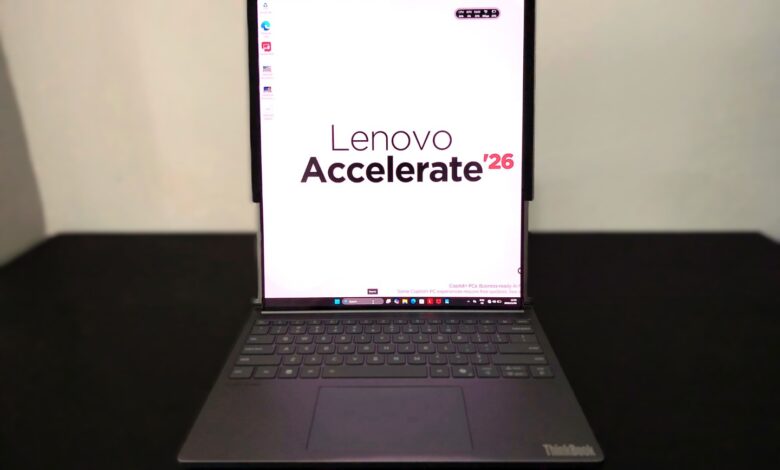
At first glance, it looks like a fairly conventional 14-inch business laptop. The interesting part becomes apparent when you activate its motorised display. The screen extends upwards, transforming the compact panel into a much taller 16.7-inch display. There is no detachable screen, no second panel to prop up and no external accessory required. The laptop simply creates more display space when you need it.
It is a genuinely interesting approach to mobile productivity. And unlike some experimental laptop designs, the idea has a fairly obvious practical purpose.

A conventional laptop with an unconventional trick
The ThinkBook Plus Gen 6 Rollable does not immediately announce how different it is. Lenovo has kept the overall design relatively restrained, with an aluminium chassis finished in Luna Grey and a dual-tone appearance. It looks appropriate in an office, a meeting room or a business travel environment.
The chassis measures approximately 303.5 x 230.6 x 19.9mm and weighs around 1.69kg. That is not particularly heavy for a laptop offering a 16.7-inch display, although it is certainly heavier than many conventional 14-inch ultraportables.
The additional weight and thickness are understandable when you consider the mechanical system housed inside the chassis. This is not simply a flexible display that has been fitted into a standard laptop lid. There is a motorised mechanism, supporting components and a carefully engineered path for the screen to extend and retract.
The important thing is that Lenovo has managed to retain the familiar laptop experience. You still get a conventional keyboard, a large touchpad and a screen that can be adjusted through the usual hinge. You do not have to learn an entirely new way of using a computer just to benefit from its unusual display.
That familiarity is one of the ThinkBook’s strongest qualities.

The rollable display is the real attraction
The headline feature is undoubtedly the flexible POLED display. In its compact configuration, the ThinkBook offers a 14-inch panel with a resolution of 2000 x 1600 pixels and a 5:4 aspect ratio. Activate the mechanism and the screen expands vertically to 16.7 inches, with the resolution increasing to 2000 x 2350 pixels and the aspect ratio changing to 8:9.
The transformation is controlled electronically, allowing the display to extend or retract without requiring the user to handle the panel manually. It is the sort of feature that will inevitably attract attention when demonstrated, but the more interesting aspect is what happens after the novelty wears off.
A conventional 14-inch laptop can become restrictive when working with lengthy documents, spreadsheets, research material, code or multiple application windows. You can always connect an external monitor, but that defeats the purpose of having a portable computer. The rollable display attempts to solve that problem without adding another screen or requiring a larger chassis.
The extra vertical space is particularly useful for reading and writing. You can see more lines of a document, keep a longer section of a spreadsheet in view or work with a browser and a supporting application without constantly scrolling. For developers, researchers, editors and professionals who spend much of their day working with text, that additional space can be genuinely useful.
The 8:9 aspect ratio is unusual, however. This is not a conventional widescreen display that expands horizontally. The screen becomes taller, making the extended configuration better suited to portrait-oriented productivity than watching films or working with conventional widescreen video.
That distinction matters. The ThinkBook is not trying to turn a 14-inch laptop into a traditional 17-inch multimedia notebook. It is offering a taller workspace.

The display also supports a variable refresh rate of up to 120Hz, with a 100 per cent DCI-P3 colour gamut, a stated brightness of 400 nits and Dolby Vision support. These are strong specifications for a productivity-focused OLED panel. Colours should appear rich, contrast is a natural strength of OLED technology, and the high refresh rate contributes to smoother scrolling and interface animations.
There are, however, a couple of compromises. The display is non-touch, and there is no pen support. That is a curious omission on a laptop built around such an unusual screen. A touchscreen would have made the expanded display more versatile, particularly for navigating documents, annotating material and interacting with applications.
The glossy finish also means reflections can become noticeable in bright environments. A 400-nit rating is reasonable for indoor use, but it does not make this an ideal screen for working outdoors under direct sunlight.
Still, the ability to expand a laptop display at the press of a button is impressive. More importantly, it addresses a real limitation of conventional notebooks rather than adding technology simply for the sake of it.
A mechanism that needs to earn your trust
A motorised screen is an interesting engineering achievement, but it also introduces a component that conventional laptops do not have: a moving display mechanism.
That raises understandable questions about reliability, long-term wear and the possibility of mechanical failure. A laptop display is something most people expect to open and close thousands of times over its lifetime. The ThinkBook adds another movement to that equation every time the user expands or retracts the screen.
Lenovo has designed the mechanism specifically for repeated operation and has published durability claims for the system. Nevertheless, this is a first-generation product category, and long-term reliability is something that only extended ownership can establish.

There is also the matter of speed. The mechanism is not instantaneous. Independent testing has reported that a complete extension or retraction takes several seconds. That is not necessarily a problem because expanding the screen is unlikely to be something you do every few minutes. However, it is worth remembering that this is a mechanical operation rather than an immediate software change.
The mechanism is the reason the ThinkBook exists, but it is also the part that makes long-term serviceability and repair costs particularly important considerations.
Intel Core Ultra 7 provides the computing power
The ThinkBook Plus Gen 6 Rollable is powered by Intel’s Core Ultra 7 258V processor, part of the Lunar Lake generation. It combines four performance cores and four low-power efficient cores, with a maximum turbo frequency of 4.8GHz.
The processor is paired with integrated Intel Arc 140V graphics and a dedicated Intel AI Boost neural processing unit capable of up to 47 TOPS. The system is classified as a Copilot+ PC, giving it access to Windows AI features designed to take advantage of local NPU processing.
This is not a workstation processor, nor is the laptop intended to compete with machines equipped with high-performance H-series processors and discrete graphics. The Core Ultra 7 258V is designed around a balance of everyday performance and power efficiency.
For the intended audience, that makes sense. Office applications, web-based platforms, communication tools, research, document editing, presentations and general multitasking are all within its comfort zone. The processor should also be capable of handling moderate photo editing and lighter creative workloads.

The integrated Arc graphics are considerably more capable than the basic integrated graphics found in older business notebooks. They can handle everyday graphics acceleration and some light gaming, but this is not a laptop designed for demanding AAA gaming or sustained GPU-intensive production work.
The 32GB of LPDDR5X memory, running at 8533MHz, is generous for a portable productivity machine. It provides sufficient capacity for running multiple applications and keeping a substantial number of browser tabs open. However, the memory is soldered to the motherboard and cannot be upgraded.
That is an important purchasing consideration. You cannot buy a lower-memory configuration today and upgrade it later. The 32GB configuration is effectively what you are committing to for the lifetime of the machine.
Storage is handled by a PCIe 4.0 NVMe SSD, with Lenovo listing configurations of up to 1TB. The drive uses an M.2 2242 format, and the storage is replaceable, which is a welcome contrast to the fixed memory.
For a laptop positioned as a premium productivity device, the combination of a modern processor, 32GB memory and fast SSD storage is sensible. It is not the most powerful configuration available at this price level, but raw computing power is not the primary reason to consider this machine.

Productivity first, gaming second
The Intel Core Ultra 7 258V is particularly interesting because it prioritises efficiency without completely sacrificing performance. The processor is capable of handling demanding everyday workloads, although it does not deliver the sustained multi-core performance of larger processors designed for workstations or high-performance laptops.
The integrated Arc 140V graphics also make the machine more versatile than a typical office notebook. Casual gaming, older titles and less demanding games are possible, depending on resolution and graphics settings. Creative applications that benefit from integrated GPU acceleration should also run reasonably well.
However, anyone planning to work extensively with 4K video timelines, complex 3D projects, heavy rendering or large AI workloads should look elsewhere. The ThinkBook’s thermal and power envelope is designed around portability and efficiency, not sustained workstation performance.
Its NPU is useful for supported local AI workloads and Windows features, but the presence of a 47-TOPS NPU should not be confused with the performance of a dedicated AI workstation. The practical benefits depend on application support and the workloads being run.
In other words, the ThinkBook is a capable business laptop with an unusual display, not a high-performance workstation disguised as one.

Keyboard and touchpad
One area where Lenovo has sensibly avoided experimentation is the keyboard. The ThinkBook retains a conventional edge-to-edge layout with a six-row design, backlighting and a dedicated Copilot key.
The keyboard is spill-resistant and has approximately 1mm of key travel. That is relatively shallow compared with some of Lenovo’s more traditional business keyboards, but the layout remains familiar and should be comfortable for everyday typing.
For people who spend much of their working day writing, responding to emails or preparing documents, the keyboard matters considerably more than a flashy specification. Lenovo has at least kept this part of the experience conventional.
The glass haptic touchpad is another positive inclusion. It supports Precision TouchPad gestures and provides a large surface for navigation. A haptic implementation also means there is no traditional mechanical click mechanism beneath the surface.
The touchpad is responsive and fits the premium positioning of the laptop. It is a sensible design choice, particularly when the machine already has enough moving parts elsewhere.

Connectivity: perhaps its biggest practical compromise
The ThinkBook Plus Gen 6 Rollable has a rather limited selection of physical ports. You get two Thunderbolt 4 USB-C ports and a 3.5mm headphone and microphone combo jack. That is essentially it.
There is no traditional USB-A port, HDMI output, Ethernet connection or SD card reader. Both USB-C ports support high-speed connectivity and docking, but you will need adapters or a dock if your workflow involves conventional peripherals.
For someone who works primarily with cloud services, wireless accessories and USB-C equipment, this may not be a major issue. For photographers, content creators and professionals who regularly connect external storage, cameras, projectors and other devices, the limited selection becomes inconvenient.
The Thunderbolt 4 support does at least provide flexibility. The laptop can connect to compatible docks and external displays, including configurations with two external monitors. That helps compensate for the lack of built-in ports, although it adds to the accessories you may need to carry.
Wireless connectivity is more future-ready, with Intel Wi-Fi 7 and Bluetooth 5.4. The combination should provide fast wireless networking and reliable connectivity with compatible peripherals. Still, a premium productivity laptop should ideally offer more flexibility out of the box. Two USB-C ports feel restrictive, particularly when one may be occupied by power.

Camera, audio and security
The ThinkBook includes a 5MP RGB and infrared camera with a time-of-flight sensor. The infrared component enables Windows Hello facial recognition, while the electronic shutter provides a way to protect privacy when the camera is not in use.
The camera specification looks promising on paper, although resolution alone does not determine image quality. Independent testing has found that image quality can still show graininess in video calls. It should be adequate for regular meetings, but it is not a replacement for a dedicated external webcam.
Audio is handled by two 2W speakers tuned by Harman Kardon, with Dolby Atmos support. The dual-microphone array also supports voice processing for meetings.
The speakers are surprisingly capable for a relatively compact business notebook. They should be perfectly adequate for video meetings, online presentations and casual entertainment. They are not intended to replace a dedicated audio system, but the inclusion of Harman Kardon tuning is welcome.
Security features include the fingerprint reader integrated into the power button, Windows Hello facial recognition, TPM 2.0 and the webcam privacy shutter. These are appropriate features for a laptop aimed at professionals who regularly handle business information.

Battery life: the price of a bigger display
Lenovo has fitted the ThinkBook with a 66Wh battery and includes a 65W USB-C GaN charger. The battery supports Rapid Charge, with Lenovo claiming that it can reach 80 per cent in approximately one hour under the specified charging conditions.
The manufacturer quotes up to 11.7 hours under its MobileMark battery test and up to 14.9 hours of local 1080p video playback. These are laboratory figures, and real-world results will vary considerably depending on screen brightness, applications, wireless connectivity and whether the display is extended.
Independent testing provides a more useful indication of what to expect. Notebookcheck recorded approximately 10 hours and 20 minutes in its Wi-Fi browsing test, while Tom’s Hardware measured 9 hours and 28 minutes with the display retracted and 8 hours and 43 minutes with it extended.
That difference is understandable. The larger active display has more pixels to illuminate and places additional demands on the system. For everyday office work, the battery should be sufficient for a substantial part of the working day, but heavy multitasking, high brightness and sustained workloads will reduce that figure.
It is also worth carrying the supplied charger if you expect to work away from a power outlet for extended periods. The 65W GaN adapter is a practical inclusion. It is relatively compact and uses USB-C, so it can also be useful with other compatible devices.

Software and the rollable experience
The ThinkBook runs Windows 11 and includes Lenovo’s own utilities, including Lenovo Vantage and software intended to support the rollable display experience. The additional screen space is handled through software that allows the display to expand and provides controls for the extended configuration. Lenovo has also introduced workspace-related features designed to make better use of the taller screen.
This is an important part of the product. A rollable display is only useful if Windows and the applications running on it adapt properly. Simply increasing the resolution does not automatically make every application more productive. The extended portrait-oriented layout can be useful for documents, browsers and communication applications, but not every programme is designed to take advantage of such an unusual aspect ratio. Some applications may require window resizing or layout adjustments.
Lenovo’s software approach will therefore play a significant role in determining how useful the display remains beyond the initial excitement. The underlying hardware is impressive, but the experience needs to be intuitive enough that users do not have to spend time managing the screen every time they open a different application.

The price of being different
The ThinkBook Plus Gen 6 Rollable launched at approximately AED 15000, placing it firmly in premium laptop territory. That is a substantial amount of money for a laptop powered by an integrated-graphics processor. At this price, buyers are not simply paying for the Core Ultra 7, 32GB of memory and 1TB SSD. They are paying for the engineering, flexible OLED panel and motorised mechanism that make the device possible.
For someone who simply needs a powerful business laptop, there are more conventional options that offer better connectivity, stronger sustained performance or more flexibility for the same investment.
But that is not really the point of the ThinkBook. Its appeal lies in offering something that conventional laptops cannot: a genuinely larger working display without requiring a larger laptop footprint or an additional screen.
The question is whether that particular advantage is valuable enough to justify the premium. For people who regularly work with long documents, research material, code, spreadsheets and multiple windows, it could be. For someone whose work mostly involves email, meetings and occasional document editing, the additional screen space may not justify the expense.
Verdict: an impressive idea with a practical purpose
The Lenovo ThinkBook Plus Gen 6 Rollable is one of those products that reminds us why laptop innovation still matters. It takes a familiar form factor and introduces a feature that is not merely decorative. The ability to expand a 14-inch display into a 16.7-inch vertical workspace has genuine productivity potential.
Lenovo has also avoided making the rest of the laptop feel like an experiment. The aluminium chassis, comfortable keyboard, haptic touchpad, modern processor, 32GB memory and OLED panel make it a capable premium notebook in its own right.
However, the compromises are difficult to ignore. The display is non-touch, the port selection is limited, the memory cannot be upgraded, and the unusual aspect ratio is not suited to every application. The mechanism also introduces a new long-term reliability consideration. And then there is the price.
The ThinkBook Plus Gen 6 Rollable is not a laptop I would recommend simply because it has the latest processor or the most impressive specifications. It is a specialist productivity machine for people who can genuinely benefit from having more vertical screen space while travelling or working away from a desk.
It is also an important demonstration of what the next generation of laptops could look like. We have spent years making computers smaller. Lenovo is asking a different question: what if a laptop could remain compact when you carry it, but become significantly larger when you sit down to work?
That is a much more interesting proposition than another incremental processor upgrade. The ThinkBook Plus Gen 6 Rollable may not be for everyone, but it makes a convincing case that the future of laptop displays does not necessarily have to be flat, fixed or conventional.
Price: AED 15000 approx.
Lenovo ThinkBook Plus Gen 6 Rollable AED 15000 approx.
-
Final Rating
Summary
The Lenovo ThinkBook Plus Gen 6 Rollable is one of those products that reminds us why laptop innovation still matters. It takes a familiar form factor and introduces a feature that is not merely decorative. The ability to expand a 14-inch display into a 16.7-inch vertical workspace has genuine productivity potential.